GitHub Games are becoming popular among people who enjoy free browser games and open-source projects. GitHub is mainly a platform where developers store and share software code, but it also contains thousands of gaming projects. Some games can run directly in a web browser, while others need to be downloaded or built from source code. Players can find puzzle, arcade, strategy, racing, educational, and multiplayer projects. This guide explains how these games work, where to find them, and how to use them safely.
What Are GitHub Games and How Do They Work?
GitHub is not an official online gaming website like Steam or other game stores. Instead, developers create game projects and store their files inside GitHub repositories. A repository can include game code, images, sounds, instructions, updates, and downloadable releases. Public repositories can normally be viewed by anyone, which makes GitHub useful for both players and developers.
Many GitHub Games are made with technologies such as HTML, CSS, JavaScript, TypeScript, WebGL, and WebAssembly. Small browser games may work with only HTML and JavaScript, while larger projects can use game engines or advanced libraries. This makes GitHub home to everything from simple Tic-Tac-Toe projects to larger strategy and multiplayer games.
How to Find Free GitHub Games Online
The easiest way to find games is through GitHub search and GitHub Topics. Users can search terms such as “browser game,” “HTML5 game,” “JavaScript game,” “open-source game,” or “web game.” Topic pages group similar repositories together, which makes it easier to compare different projects and discover active games.
When searching for GitHub Games, check the repository’s description, README file, stars, recent commits, Issues section, and Releases page. A clear README usually tells you what the game does and how you can play it. Recent updates can also show whether the developer is still maintaining the project. Older games may still work, but some can have outdated files or broken features.
Best Types of GitHub Games You Can Play
GitHub contains many different game genres. Puzzle and arcade games are especially common because they are easy to create with browser technology. Popular project types include Snake, Pong, Breakout, card games, word puzzles, platform games, shooting games, and endless runners. Many of these projects are small, fast, and suitable for desktop browsers.
There are also more advanced projects, including real-time strategy games, sandbox games, role-playing games, multiplayer games, and educational games. Some developers use gaming to teach coding, mathematics, science, or computer systems. This variety means both casual players and programmers can find useful projects depending on what they want to play or learn.
How to Play GitHub.io Games in Your Browser
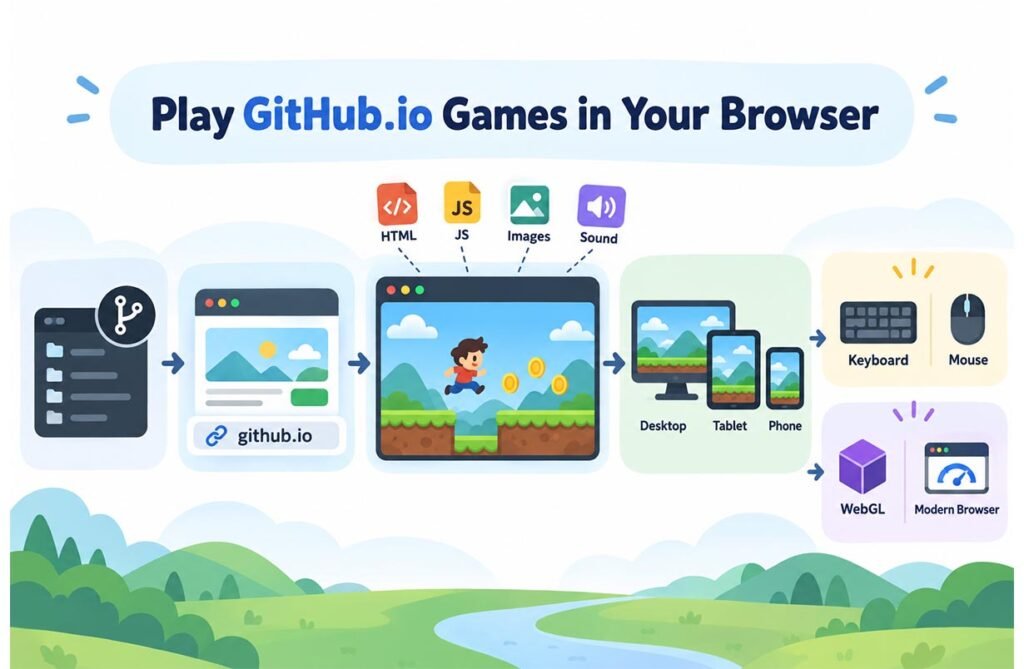
Many online projects use GitHub Pages, a service that can publish static website files from a GitHub repository. These websites often use an address ending in github.io. A project site may look similar to. If the developer provides a playable link, users can usually open it and start playing without installing normal desktop software.
Browser-based GitHub Games normally load HTML, JavaScript, images, sounds, and other files directly in the browser. Games designed with responsive controls may also work on phones and tablets. However, some projects need a keyboard or mouse, so mobile support can vary. Advanced games can also require WebGL or modern browser features to run correctly.
How to Download Games from GitHub Safely
Not every game has an online version. Some projects must be downloaded. GitHub lets users download repository files as a ZIP, while developers can also clone a repository with Git. A project may provide ready-to-use files under its Releases section, which is often easier for normal players than working with raw source code.
Safety is important when downloading files. Check who created the project, whether it has recent activity, and whether users report problems in the Issues section. Be more careful with unknown EXE files, scripts, installers, or programs requesting special permissions. Using security software to scan downloaded files can add another layer of protection. A public GitHub repository does not automatically mean every file inside it is safe.
GitHub Pages and Browser Game Hosting Explained
GitHub Pages is useful for developers who want to publish a simple web game without setting up a traditional hosting server. A developer can place HTML, CSS, JavaScript, images, and related assets inside a repository and configure Pages to publish them. The game can then become available through a public web address.
This method works well for static browser games because much of the game runs on the player’s device. However, GitHub Pages is not designed as a full gaming server. Games that need large databases, complex server systems, or advanced real-time multiplayer features may require other services. Developers often use Pages for demos, portfolios, small games, and playable versions of coding projects.
Are GitHub Games Safe and Legal to Use?
Most legitimate GitHub Games can be used safely when they come from trustworthy developers and well-maintained repositories. Still, users should remember that GitHub allows many people to publish public projects. A address shows that the website uses GitHub Pages, but it does not guarantee that every game or project is trustworthy.
Legal use depends strongly on the project’s license. Open-source games may use licenses such as MIT, GPL, Apache, or BSD. Each license has its own rules for copying, changing, and sharing code. Publicly visible source code does not always mean users can reuse it without limits. Game artwork, music, logos, and other assets may also have separate copyright rules.
GitHub Games for Developers and Coding Beginners
Game projects can be valuable learning tools for people who want to understand programming. Beginners can study simple games to learn variables, loops, user input, collision detection, scoring systems, timers, animation, and game state. Because the source code is often visible, learners can see how real projects are organized.
More experienced developers can study larger GitHub Games to understand game engines, WebGL graphics, networking, multiplayer systems, and project structure. If the license allows it, developers may also fork a project, improve features, fix bugs, or create their own version. GitHub therefore works as both a place to discover games and a practical learning platform for game development.
Best Tips for Choosing a Good GitHub Game
Start by checking the README because it normally gives the most useful information about the project. Look for clear installation or playing instructions, supported operating systems, browser requirements, controls, screenshots, and links to a live demo. Also check when the project was last updated. Active repositories are often easier to use than projects that have been abandoned for years.
Do not judge quality only by the number of stars. A smaller project can still be useful and enjoyable. Check open Issues, user comments, releases, and the license. For browser play, prefer projects with a clear GitHub Pages or live-demo link. For downloads, official releases from the project’s own repository are usually easier to understand than random files shared somewhere else.
FAQs
Are games on GitHub free?
Many games are free to access or download, but every project can have different rules. Always check its license and developer instructions.
Can I play GitHub games without downloading them?
Yes. Games published through GitHub Pages can often be played directly in a modern web browser.
What does GitHub.io mean?
GitHub.io is commonly used for websites published with GitHub Pages, including portfolios, documentation, demos, and browser games.
Can I change the code of a GitHub game?
You can modify projects when their open-source license allows it. Always read the license before changing or redistributing code.
Are GitHub game downloads safe?
Many are safe, but safety is not guaranteed. Check the developer, project history, user reports, file type, and repository activity before downloading.