Github Games All may include puzzles, arcade titles, coding games, strategy projects, and small experiments. Some run in a browser through GitHub Pages, while others only provide source code. This guide explains how these projects work, how to find playable versions, and what to check before using them.
What Are Games on GitHub and How Do They Work?
A game on GitHub normally lives inside a repository. This is a project area that can contain code, images, sounds, instructions, and a record of changes. For web games, developers often use HTML, CSS, and JavaScript. GitHub Pages can take these static files from a repository and publish them as a website, so a game can open in a normal browser.
A repository is not always a ready-to-play game. Some projects give only source code, while others add a Play, Demo, or live-site link in the README. GitHub Pages is designed for static sites and does not run server-side languages such as PHP, Ruby, or Python. Games that need accounts, databases, or special servers may use GitHub for code but another service for actual gameplay.
Why People Explore Github Games All
The main attraction is variety. You can find short puzzle games, Popular Games, typing games, strategy projects, retro-style games, and educational titles. Many browser projects do not require a large installation. You can open a live page, understand the controls, and begin playing.
The platform is also useful for learning. A public repository lets you look behind the game and see how controls, scoring, animation, menus, and levels are built. This gives beginners a way to connect a finished game with real code instead of learning only from theory.
Popular Browser Games and Projects to Try
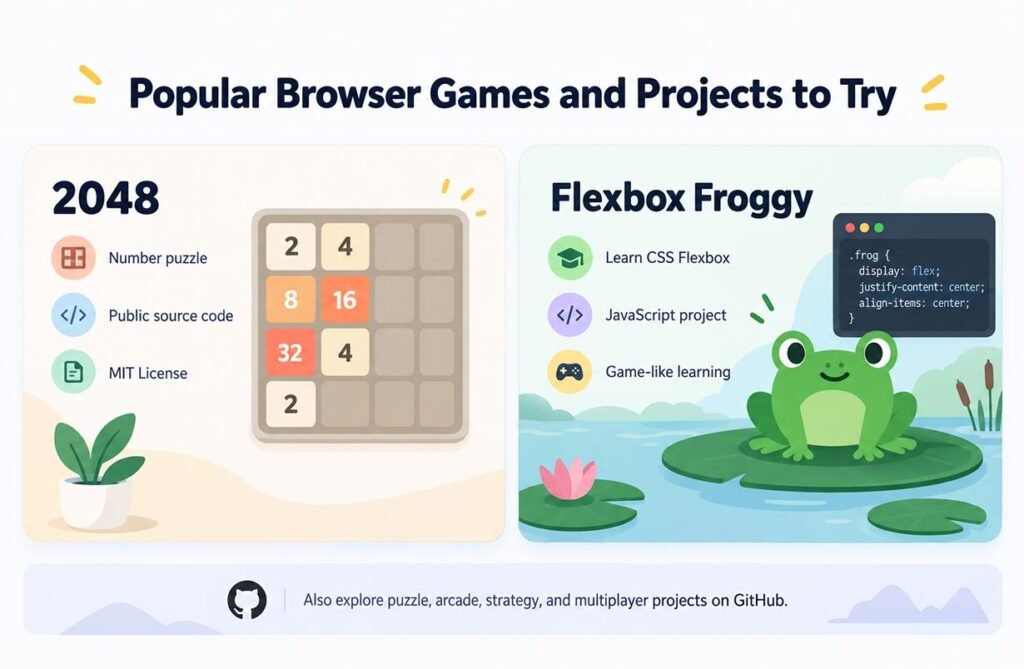
2048 is a strong example of a well-known web game with public source code. The repository by Gabriele Cirulli describes it as a small number puzzle, links to a playable version, and uses the MIT License.
Another useful project is Flexbox Froggy, which teaches CSS Flexbox through a game-like experience. GitHub’s game topic lists it as a JavaScript project for learning CSS. GitHub also contains multiplayer, puzzle, arcade, and strategy projects. Live links can change, so always check the current repository before you try one.
How to Find Good Game Projects on GitHub
Start with GitHub topic pages. Useful search terms include browser-game, webgames, open-source-game, puzzle-game, platformer, and strategy-game. You can also filter by programming language, such as JavaScript or TypeScript. GitHub topics are designed to help people discover repositories connected to the same subject.
After opening a project, read the README first. Look for a live link, setup steps, controls, screenshots, license details, and recent activity. Check whether the project has been updated and whether users report broken features in the issue section. An old repository may still contain useful code even if its demo no longer works.
How GitHub Pages Makes Games Playable
GitHub Pages is a static site hosting service. It can publish HTML, CSS, JavaScript, and other static files from a repository. A project site normally uses an address based on the owner name and repository name.
For players, this often means there is nothing to install. Open the live link and the browser loads the game files. For developers, it offers a simple way to show a working demo beside the source code. However, more complex games may need external APIs, multiplayer servers, or databases. In those cases, GitHub Pages may only provide the front end.
Technologies Used to Build Browser Games
Many Github Games All use standard web technology. HTML creates the page structure, CSS controls layout and appearance, and JavaScript handles movement, input, score systems, timers, and game rules. HTML5 Canvas is often used for 2D drawing. WebGL can support richer graphics, while TypeScript adds type checking that can help with larger projects.
Developers may also use libraries or engines. Phaser is common in 2D web-game development, while Three.js is often used for browser-based 3D graphics. The tools chosen can affect loading speed, browser support, mobile controls, graphics, and how easy the code is for a beginner to understand.
Are Github Games All Safe and Legal?
Use the same care you would use with any unfamiliar website or download. Prefer the original repository, check where the live link leads, and be careful with unknown executable files. Public source code can make a project easier to inspect, but it does not prove that every fork, dependency, download, or outside link is safe.
Playing and reusing are different questions. A public repository is not automatically open source. GitHub explains that a license gives people clear permission about using, changing, and distributing code. Without a license, normal copyright rules still apply. Before copying code, art, music, fonts, or other assets, read the LICENSE file and project notes carefully.
Why These Projects Help Players and Developers
For players, Github Games All can offer simple, creative titles that are easy to open and explore. For students, they can turn a game into a learning tool because the visible result and the source code can sit side by side. A beginner can play a puzzle, open its files, and then see how the controls, score, layout, or animation were created.
For developers, repositories can show project structure, bug reports, contribution rules, and publishing methods. A good starting method is simple: play a small web game, read its README, inspect the main files, and then check its license. This gives you a full view of how an idea becomes code and how code becomes a playable web experience.
FAQs
Can I play games directly from GitHub?
Sometimes. Many projects link to a live browser version, while others provide only code and setup instructions.
Do I need a GitHub account to play?
Usually not. A public GitHub Pages site can normally be opened without signing in.
Are all public game repositories open source?
No. A public repository can be viewed, but reuse rights depend on its license and copyright terms.
What is an easy project to explore first?
2048 is a useful starting point because its repository is public and it links to a playable web version.
Can I publish my own browser game on GitHub?
Yes. A static game made with HTML, CSS, and JavaScript can be stored in a repository and published with GitHub Pages.