If your Nintendo Switch keeps warning you about low storage, you’re not alone. Even years after launch, the Switch’s limited internal memory remains one of its biggest pain points, especially as modern games and updates grow larger. This is where Nintendo Switch archive data comes in.
In simple terms, Nintendo Switch archive data lets you remove a game’s downloaded files from your console while keeping your save data and ownership intact. You free up space without losing progress, and you can reinstall the game later with just a few clicks. For many players, archiving is the safest and most practical way to manage storage.
Understanding how archive data works and how it differs from deleting software can save you time, storage space, and frustration.
What Is Nintendo Switch Archive Data?
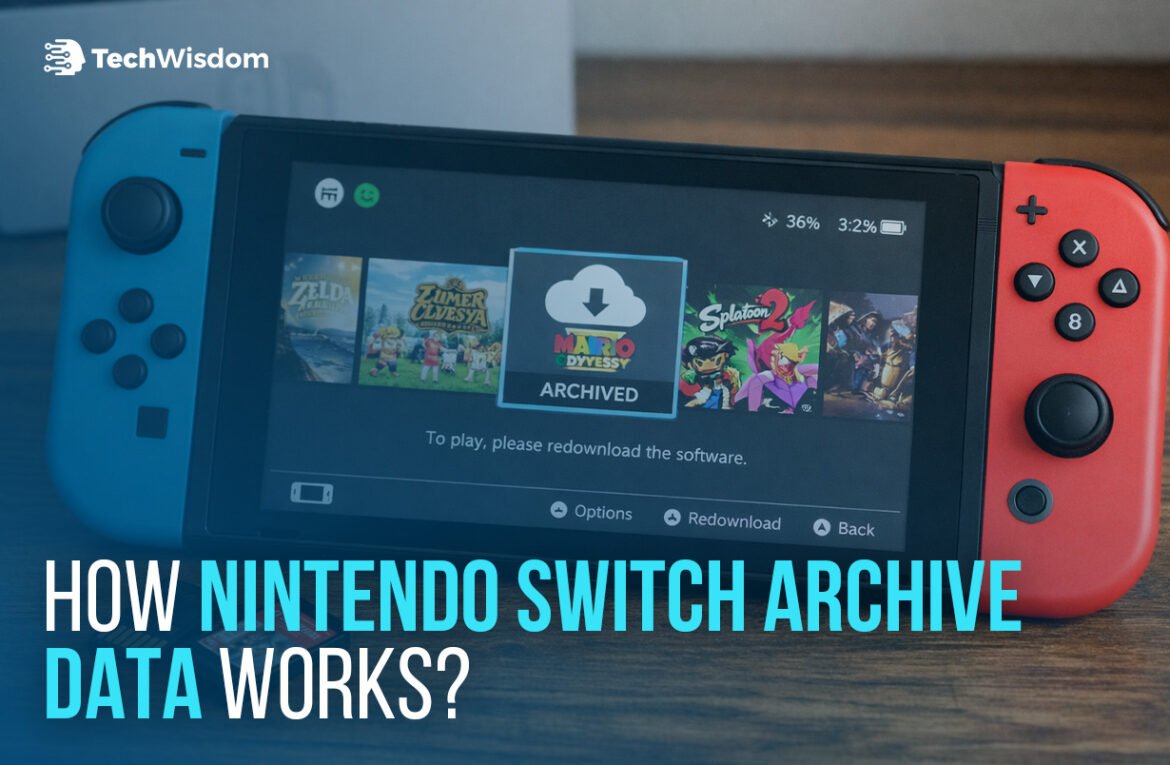
Nintendo Switch archive data refers to the state of a game after you choose “Archive Software” in the system settings or from the game’s menu. When a game is archived:
- The game’s software files are removed from internal storage or the microSD card
- Save data remains untouched on the system
- The game icon stays on the HOME Menu
- Selecting the icon prompts a re-download from the Nintendo eShop
Nintendo designed this system to reduce the risk of storage management. Save files are stored separately from game software, so archiving never affects your progress unless you manually delete save data through a different menu.
Archive vs Delete: What’s the Difference?
This is one of the most common points of confusion among Switch owners.
Archive Software
- Removes downloaded game data
- Keeps save data
- Keeps the game icon on the HOME Menu
- Allows instant re-download from the icon
Delete Software
- Removes downloaded game data
- Keeps save data
- Removes the game icon
- Requires going to the eShop’s “Redownload” section
Both options free up storage, but archiving is usually the better choice if you plan to play the game again. Deleting software is more about decluttering your HOME screen, not saving additional space.
Why Nintendo Switch Archive Data Is Still Essential
Nintendo Switch storage limits continue to affect players years after the console’s release. Game file sizes have increased steadily, with major releases and post-launch updates often taking up double-digit gigabytes. For players who rely heavily on digital downloads, internal storage can fill up quickly even with a microSD card installed.
At the same time, Nintendo continues to support multiple Switch models with the same base system storage. That means features like archive data remain a core part of everyday console management rather than a temporary workaround. As digital libraries grow and older games receive ongoing updates, archiving software has become one of the most practical tools for keeping a Switch usable without constantly deleting content.
How to Archive Games on Nintendo Switch
There are several ways to archive software, depending on how you prefer to manage your system.
From the HOME Menu
- Highlight the game
- Press the + or – button
- Select Manage Software
- Choose Archive Software
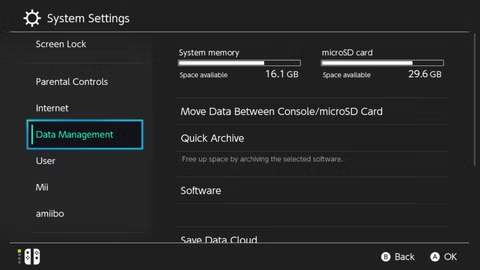
From System Settings
- Open System Settings
- Go to Data Management
- Select Manage Software
- Choose a game and select Archive Software
Nintendo also offers a Quick Archive option, which suggests games you haven’t played in a while and lets you archive multiple titles at once.
What Happens When You Re-Download an Archived Game?
When you re-download an archived game, the Switch restores the software exactly as it was last installed, including updates. Your save data reconnects automatically, so you can continue where you left off.
One thing to keep in mind: re-downloading requires a stable internet connection and enough free space on your chosen storage location. If you archived the game from internal memory but now have a microSD card installed, the Switch will usually download it to the card instead.
Common Mistakes to Avoid
- Confusing archive data with save data deletion: These are separate actions. Saved data is only removed manually.
- Archiving physical (cartridge) games unnecessarily: Cartridge games don’t take up much storage unless they have large updates.
- Ignoring update sizes: Archived games may download large patches when reinstalled, using more space than expected.
The Bottom Line
Nintendo Switch archive data is one of the console’s most useful but misunderstood features. It gives players a safe way to manage limited storage without sacrificing progress or having to repurchase games. As digital libraries continue to grow, archiving remains the smartest option for most Switch owners.
For anyone regularly hitting storage limits, mastering archive data isn’t optional; it’s essential.
FAQ
What is Nintendo Switch archive data?
Nintendo Switch archive data is created when a game’s software is removed to free storage while keeping save data and ownership intact.
Does archiving a game delete save data?
No. Archiving does not affect saved data. Save files remain on the system unless manually deleted.
Can I re-download archived games for free?
Yes. Archived games can be re-downloaded at no cost from the HOME Menu or the Nintendo eShop.
Is archiving better than deleting software?
For most players, yes. Archiving keeps the game icon visible and makes re-downloading faster and easier.
Does archiving work for physical games?
Archiving mainly affects downloaded data. Physical cartridge games rely less on internal storage unless they have large updates.