Hotstar Download for PC because they want to enjoy movies, TV shows, and live sports on a bigger screen. In India, Hotstar now works under the JioHotstar name after JioCinema and Disney+ Hotstar joined together on February 14, 2025. PC users can access the service mainly through its official website without installing a separate Windows program. This makes it simple to watch entertainment on Windows 10 or Windows 11.
What Is Hotstar and JioHotstar?
Hotstar became popular as a streaming platform for Indian TV shows, movies, original series, and live sports. In February 2025, JioStar launched JioHotstar, combining the content and services of JioCinema and Disney+ Hotstar into one streaming platform.
Today, JioHotstar offers drama, movies, sports, and entertainment in many Indian languages. Its current platform includes Bollywood and regional films, Hotstar Specials, live cricket, football, and international content from brands such as Disney, Marvel, Pixar, Star Wars, HBO, Paramount, and National Geographic.
Is Hotstar Available for PC?
Users looking for Hotstar Download for PC may expect a normal Windows installation file. However, PC users do not usually need a separate EXE program. JioHotstar can be opened directly from its official website using a modern web browser.
This approach is easier because users do not need to install another application. They can open the website, sign into their account, choose a movie or sports event, and start watching. The official website also promotes its Android and iOS applications for mobile devices.
How to Watch Hotstar on Windows 10 and 11
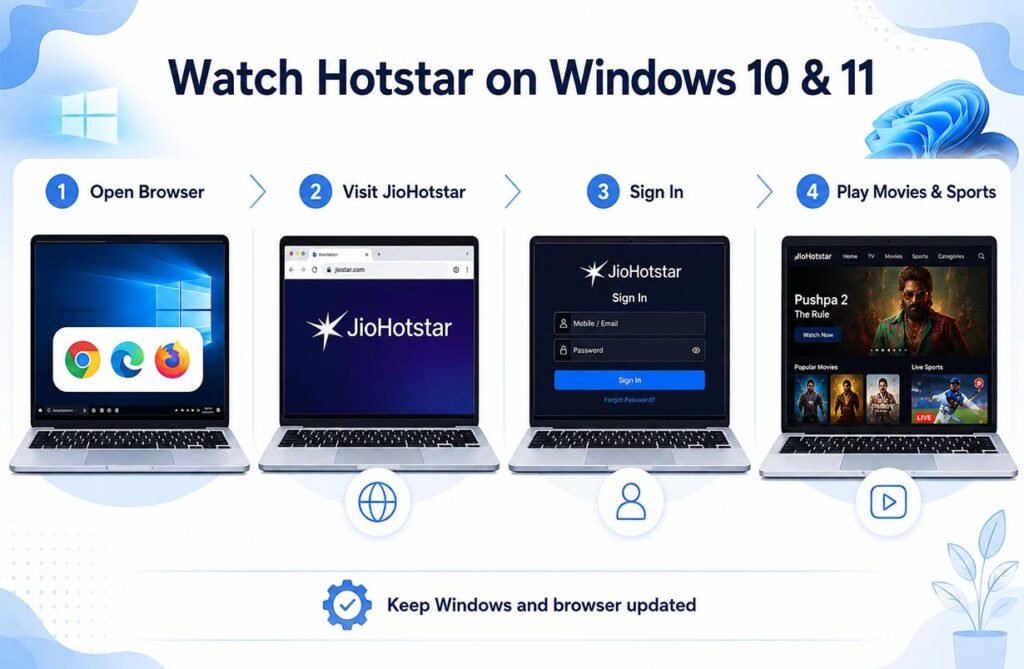
The simplest method for Hotstar Download for PC is to use JioHotstar in a browser. Open Google Chrome, Microsoft Edge, or another supported browser on your Windows computer. Visit the official JioHotstar website and sign in with your account.
Once logged in, you can browse for movies, series, TV programs, or sports. Select the content you want and press play. Windows users should keep their operating system and browser updated because older software may cause playback, login, or video-quality problems.
Official and Safe Download Methods
Users should always choose official sources when accessing JioHotstar. The official JioHotstar Android app is available through Google Play, where JIOSTAR INDIA PRIVATE LIMITED is listed as the developer. The official website also links users to Google Play and Apple’s App Store.
Avoid websites offering files such as “Hotstar Premium Crack,” unofficial APK packages, or unknown Windows installers. Such files are not needed for normal PC streaming and may contain malware or unwanted programs. Using the official website is the easiest and safer option.
Movies and TV Shows on Hotstar PC
One major advantage of Hotstar Download for PC is the large entertainment library. JioHotstar includes Bollywood movies, Hollywood films, regional cinema, TV programs, web series, and Hotstar Specials.
International entertainment is also available. Depending on the current plan and streaming rights, viewers can find content connected with Disney, Pixar, Marvel, Star Wars, HBO, Peacock, Paramount, and National Geographic. The library can change because streaming licenses do not always remain permanent.
Watching Live Sports on Hotstar PC
Sports remain an important part of JioHotstar. The service carries live sports, cricket highlights, and other sporting events. Watching on a PC gives users a larger display than a smartphone, which can make long matches more comfortable to follow.
The exact sports available can change from one season to another because broadcasting rights change. Users interested in cricket, football, or another competition should check the JioHotstar Sports section before buying a subscription only for one event.
Can You Download Movies on a PC?
There is an important difference between Hotstar Download for PC and downloading a movie from Hotstar. Accessing JioHotstar on Windows does not mean every film or show can be saved as a normal video file.
Offline viewing features are normally connected with supported applications, devices, plans, and selected titles. On a Windows computer, the standard method is online streaming through the browser. Users should not use third-party tools that claim to remove protection or download paid videos as MP4 files.
JioHotstar Subscription Plans
JioHotstar offers different subscription choices with different benefits. Its official help center states that the platform refreshed its plans on January 28, 2026, with plans starting from ₹79. Prices and benefits can change, so users should confirm the current amount before subscribing.
Different plans may affect device access, content availability, advertising, or premium entertainment. Users should choose a plan based on what they normally watch instead of paying for features they may not need.
Getting Better Streaming Quality
A stable internet connection is important when watching movies or live matches. Slow Wi-Fi may cause buffering, reduced picture quality, or interruptions. If streaming is unstable, pause large downloads, close unnecessary applications, or move closer to the router.
Using an Ethernet connection can also improve stability on a desktop or laptop. Users should keep Windows, Chrome, Edge, and graphics drivers updated. A good display and reliable connection can make movies and sports much more enjoyable.
Common Hotstar PC Problems and Fixes
If JioHotstar does not work properly, first refresh the page and restart the browser. Clearing browser cache and cookies can also solve login or loading problems. Try another browser if the video still does not start.
Ad blockers, privacy extensions, outdated browsers, or unstable internet can sometimes interfere with streaming. Users should also avoid unsupported VPN or proxy services because regional streaming rights may affect access. Checking the official help center is useful when an error continues.
Is Hotstar Safe to Use on Windows?
Using Hotstar Download for PC through the official JioHotstar website is generally the most practical approach. Users do not need unofficial software just to watch movies or sports on Windows.
Always check the website address before entering account or payment details. Avoid cracked applications, modified APK files, and websites promising free premium access. Official services may require payment for certain content, and trusted payment methods should always be used.
Why Watching Hotstar on PC Makes Sense
A PC provides a bigger screen, better viewing comfort, and easier access to external speakers or headphones. Laptop users can also connect a compatible monitor or television when they want an even larger display.
For most users, Hotstar Download for PC simply means accessing JioHotstar safely on Windows through a web browser. There is normally no need to search for an unknown Windows installer. Visit the official website, choose the right plan, use a stable internet connection, and enjoy available movies, shows, cricket, football, and other entertainment.
FAQs
Can I download Hotstar on Windows 11?
You can watch JioHotstar on Windows 11 through its official website using a modern browser such as Chrome or Microsoft Edge.
Is there an official Hotstar PC application?
JioHotstar mainly provides browser-based access for PC users. Its official mobile applications are available through Google Play and Apple’s App Store.
Can I watch Hotstar sports on my laptop?
Yes. Available live sports can be streamed through the JioHotstar website, subject to your location, subscription, and current broadcasting rights.
Is JioHotstar free to use?
Some access may be available without a paid plan, while premium movies, shows, sports, or features can require a subscription.
Should I download a Hotstar APK on Windows?
Normally, no. PC users can use the official website instead. Avoid unofficial APK files and modified applications from unknown websites.