
Network Optimization helps a business make its network faster, more stable, and easier to manage. It focuses on how data moves between users, devices, servers, cloud services, and websites. A good network should give users low delay, steady speed, fewer errors, and reliable access. The process includes checking traffic, finding weak points, improving settings, using better tools, and planning for future growth.
What Network Performance Really Means
Network performance is not only about internet speed. A connection can have high bandwidth and still feel slow if it has high latency, packet loss, jitter, or congestion. Bandwidth is the maximum amount of data a link can carry, while throughput is the amount of useful data that moves successfully.
Network Optimization starts by measuring these values instead of guessing. Teams should check normal traffic levels, busy hours, response times, error rates, and device use. This creates a performance baseline, which makes it easier to notice when something changes or when a network starts to slow down.
Why Better Network Performance Matters
A weak network can affect almost every digital task. Video meetings may freeze, cloud apps may respond slowly, files may take longer to upload, and websites may open late. In a business, these small delays can reduce staff productivity and create a poor customer experience.
Good performance is especially important for VoIP calls, video meetings, remote desktops, online games, cloud software, and payment systems. These services need stable connections. Improving the network can reduce delays, protect service quality, and help users complete their work with fewer interruptions.
Key Metrics You Should Monitor
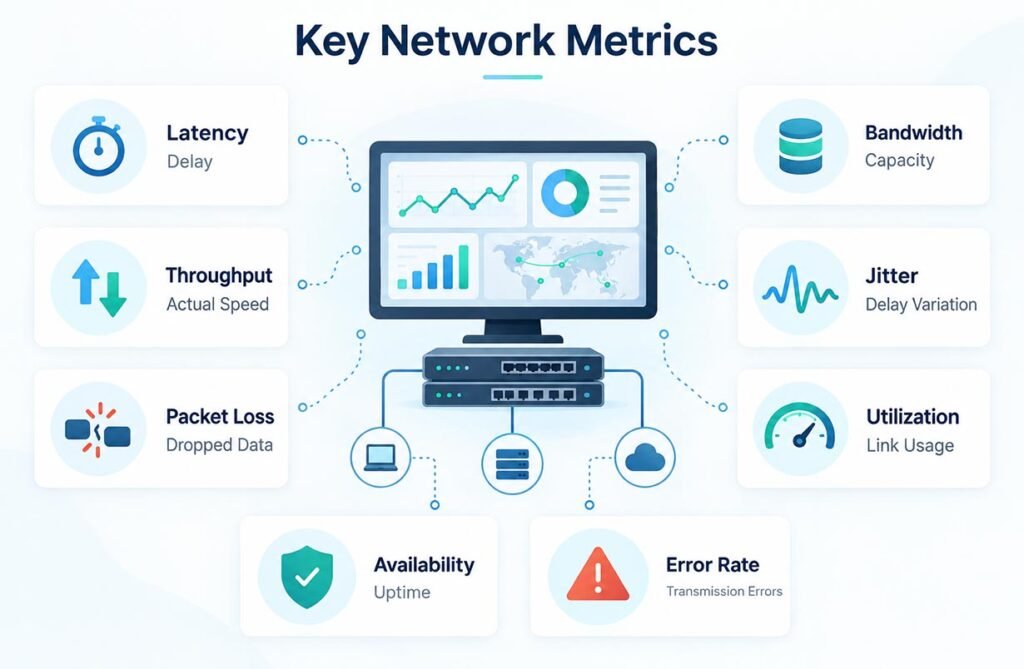
The most useful metrics are latency, bandwidth, throughput, jitter, packet loss, utilization, availability, and error rate. Latency measures how long data takes to travel. Jitter shows changes in packet delay. Packet loss means some packets never reach their destination. High utilization can show that a link is close to its limit.
Network Optimization works best when these numbers are watched over time. A single speed test gives only a short view. Continuous monitoring shows patterns, such as heavy traffic during busy hours, poor Wi-Fi in one office area, or a cloud service that becomes slow while large backups are running.
Common Problems That Slow a Network
Congestion is one of the most common problems. It happens when too much traffic tries to use the same network path. Old routers, weak Wi-Fi signals, damaged cables, overloaded firewalls, poor routing, and busy servers can also reduce performance. Sometimes the internet connection itself is not the real problem.
Distance can also increase delay. A user connecting to a server on another continent will usually have more latency than someone connecting to a nearby server. Too many network hops can add more delay, so better routing and services placed closer to users can improve the overall experience.
Best Techniques for Faster Connections
One useful method is Quality of Service, or QoS. QoS can give important traffic higher priority. For example, voice and video traffic can receive priority over large software downloads. This helps real-time services stay clear and stable when available bandwidth becomes limited.
Other Network Optimization methods include traffic shaping, caching, compression, load balancing, better routing, and bandwidth control. Traffic shaping manages sudden traffic bursts. Caching keeps common content closer to users. Load balancing shares requests across several servers so one server does not become overloaded.
Useful Tools for Testing and Monitoring
Simple tools can solve many network problems. Ping checks whether another device is reachable and shows round-trip delay. Traceroute or tracert shows the path packets take through different network points. iPerf3 can test available bandwidth between two systems and is useful for checking both TCP and UDP performance.
For deeper work, Wireshark can capture and inspect network packets. It helps teams study protocols, errors, retransmissions, and unusual traffic. Larger companies may use monitoring platforms, NetFlow, or sFlow to track activity across routers, switches, servers, cloud systems, and other important network devices.
How to Reduce Latency, Jitter, and Packet Loss
To reduce latency, place services closer to users when possible, remove unnecessary network hops, improve routing, and avoid overloaded links. A content delivery network, or CDN, can store website files in locations closer to visitors. This reduces the distance that some data must travel before reaching the user.
Network Optimization should also address jitter and packet loss. Teams can use QoS for real-time traffic, replace damaged cables, improve Wi-Fi coverage, check overloaded devices, and fix congestion. For voice and video, a stable connection is often more useful than very high maximum speed that changes constantly.
Tips for Wi-Fi, Cloud, and Remote Networks
Wi-Fi needs special attention because walls, distance, interference, channels, and connected devices can weaken the signal. Access points should be placed carefully, while teams should monitor signal strength, device load, channel use, and dead zones. Modern Wi-Fi equipment can also help when many users connect at the same time.
Cloud and remote networks need good location and routing choices. Businesses should choose cloud regions close to important users when possible. SD-WAN can help manage connections between offices, remote sites, and cloud services. Backup internet links can also keep important services working if the main connection fails.
Main Benefits for Businesses
The first benefit is faster and more stable service. Employees can use cloud tools, video calls, websites, and file systems with fewer delays. Customers also receive a smoother experience when digital services load quickly and remain available. Better monitoring can help teams find small problems before they become major failures.
This process can also control costs. A company does not always need to buy more bandwidth. Traffic data may show that a routing problem, bad device, or busy backup process is the real cause. Better planning can improve reliability, productivity, security visibility, and the use of existing network resources.
Mistakes to Avoid During Improvement
A common mistake is buying a faster internet plan before finding the real bottleneck. More bandwidth will not repair poor Wi-Fi, high latency, packet loss, bad routing, or an overloaded server. Teams should first measure network activity and identify the exact cause of the performance problem.
Another mistake is changing many settings at once. It is better to make controlled changes and compare results before and after. Keep records of important settings, traffic levels, device health, and user reports. Networks change as users and services grow, so monitoring and improvement should remain an ongoing process.
FAQs
What is the main goal of network improvement?
The main goal is to make data move faster, more reliably, and with fewer errors between users, devices, servers, applications, and online services.
Which network metric is most important?
There is no single best metric. Latency, packet loss, jitter, throughput, bandwidth, and availability should be checked together because each one shows a different part of network performance.
Can more bandwidth fix a slow network?
Not always. More bandwidth can help when capacity is the problem, but it may not fix poor routing, weak Wi-Fi, high latency, server limits, congestion, or packet loss.
What tools can test network performance?
Common tools include Ping, Traceroute, iPerf3, Wireshark, NetFlow, and sFlow. Each tool gives a different view of traffic, network paths, packets, bandwidth, or performance.
How often should a network be checked?
Important networks should be monitored continuously. Regular reviews can help teams find new traffic patterns, overloaded devices, weak connections, and capacity problems before users are strongly affected.