
If you want to learn How to Unarchive a Story on Instagram, the process is easier than it may seem. Instagram saves old Stories in a private Story Archive when this feature is turned on. However, Instagram does not give Stories a normal “Unarchive” button. Instead, you can open an old Story, share it again as a new Story, or add it to a Highlight. The steps are almost the same on both iPhone and Android.
What Happens When You Archive a Story on Instagram
An Instagram Story normally stays visible for 24 hours. After that time, it disappears from your active Story. If Save Story to Archive is enabled, Instagram can keep a private copy inside your account.
Your followers cannot normally see your Story Archive. Only you can open it from your profile. This makes the archive useful for keeping old photos, videos, travel memories, business updates, promotions, and personal moments that you may want to use again.
It is important to know that archived Stories are different from archived feed posts. A feed post can often be restored directly to your profile grid. An old Story does not return to its original place in the same way.
How to Find Archived Stories on Instagram
Before learning How to Unarchive a Story on Instagram, you first need to find your Story Archive. Open the Instagram app and go to your profile by tapping your profile picture in the lower-right corner.
Tap the three horizontal lines in the upper-right corner and select Archive. If Instagram opens Posts Archive, use the archive selector at the top and choose Stories Archive. You should now see Stories that Instagram saved after they expired.
The basic path is:
Profile → Menu → Archive → Stories Archive
Instagram may change button names or positions after app updates, but the general process normally remains similar.
How to Unarchive a Story on Instagram on iPhone
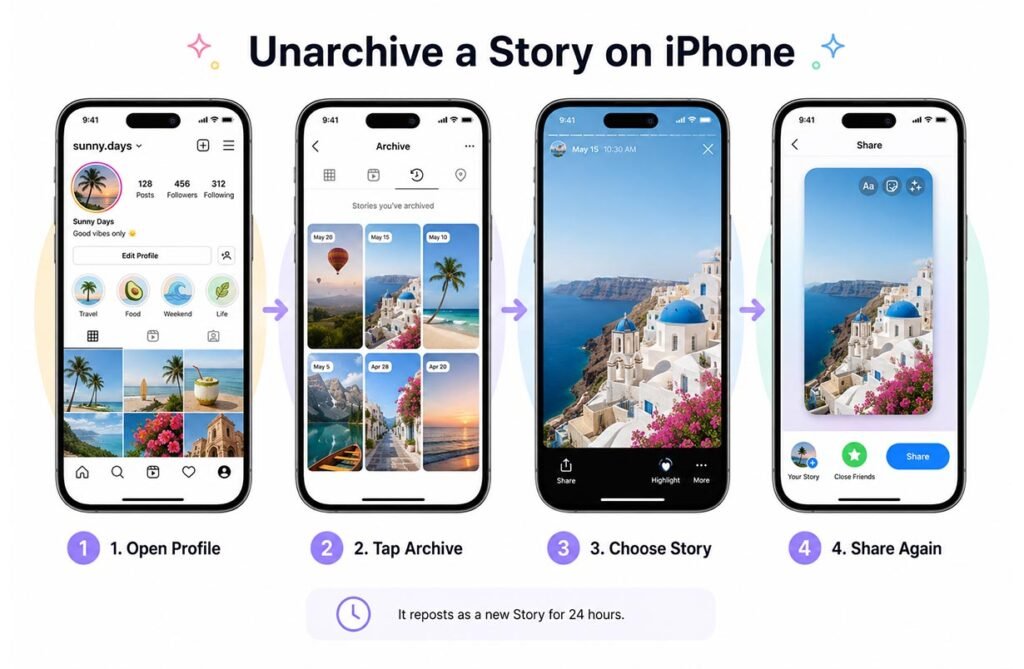
If you use an iPhone, open Instagram and sign in to the correct account. Go to your profile, tap the menu icon, and choose Archive. Make sure Stories Archive is selected.
Find the Story you want to use again and tap it. Look for the Share option near the bottom of the screen. Instagram may open the Story editor, where you can add text, stickers, GIFs, mentions, or other Story features.
Tap Your Story when you are ready to post it again.
This is the closest method to unarchiving an Instagram Story. The old Story is not restored to its original date. Instead, Instagram publishes it as a new Story, which normally becomes active again for another 24-hour period.
How to Unarchive a Story on Instagram on Android
The Android process for How to Unarchive a Story on Instagram is almost the same as the iPhone method. Open Instagram, tap your profile picture, and open the three-line menu.
Choose Archive and switch to Stories Archive if needed. Browse through your old Stories and open the one you want to bring back.
Tap Share or the available sharing option. You can then make changes before publishing. For example, you may add a new caption, mention another account, use stickers, or choose Close Friends instead of your normal Story audience.
After you publish it, Instagram treats the content as a new active Story rather than restoring the old version.
How to Reshare an Archived Story as a New Story
Resharing is the best option when you want your followers to see old content again. Open the archived Story and select Share. Instagram should take you to the Story editor.
You can leave the Story unchanged or update it before publishing. This is useful when you want to share an old memory, promote an older product, repeat an announcement, or show an important event again.
Remember that the new Story gets its own viewing period. Its new views and reactions are separate from the original Story activity.
This means How to Unarchive a Story on Instagram does not mean placing the original Story back exactly where it was. You are creating new Story activity from older saved content.
How to Add an Archived Story to Instagram Highlights
You may not want the Story to disappear again after 24 hours. In that case, adding it to an Instagram Highlight is a better option.
Open Stories Archive, select the Story, and tap Highlight. You can add it to an existing Highlight or create a new one. Give the Highlight a short name that clearly explains its content.
For example, a travel account might use Highlights such as Trips, Hotels, or Food. A business could use Reviews, Products, FAQ, or Offers.
Highlights remain on your Instagram profile until you remove them, so they are useful when an old Story should stay available longer.
Why You Cannot Find an Archived Instagram Story
Sometimes people open the Archive but cannot find the Story they want. First, check that you are viewing Stories Archive instead of Posts Archive or Live Archive.
You should also make sure you are signed in to the Instagram account that originally posted the Story. This is especially important if you manage several accounts.
Another possible reason is that Story archiving was not turned on when the Story expired. If Instagram did not save the Story at that time, turning the setting on later will not normally bring that missing content back.
An old Story may also have been deleted instead of archived.
How to Turn On Story Archive for Future Stories
If you regularly post Stories, keeping Story Archive enabled can be useful. Open your Instagram settings and look for the Story or archive-saving options. Depending on your app version, the wording may appear as Save Story to Archive or something similar.
Turn this option on so future Stories can be saved privately after they disappear from public view.
This makes How to Unarchive a Story on Instagram much easier in the future because you will have access to older content inside the archive.
It is still a good idea to save important photos and videos somewhere outside Instagram. Social platforms can change features, menus, and storage rules over time.
Archived Story vs Deleted Story on Instagram
An archived Story and a deleted Story are not the same.
An archived Story remains saved privately in your Story Archive. You can open it later, reshare it, add it to Highlights, or sometimes save it to your phone.
A deleted Story is removed from its normal location. Instagram may keep recently deleted content for a limited period in Recently Deleted, where you may be able to restore it before it is permanently removed.
If a Story is missing from Archive, check Recently Deleted before assuming it is gone forever.
For important content, archiving is usually safer than deleting because it keeps the Story available for future use.
Common Questions About Unarchiving Instagram Stories
Many users expect to find a direct Unarchive button, but Instagram Stories work differently from regular archived posts. The main options are resharing, adding to Highlights, and saving the content.
Once you understand this difference, How to Unarchive a Story on Instagram becomes simple. On both iPhone and Android, open your profile, go to Archive, select Stories Archive, choose your old Story, and decide whether to share it again or keep it visible through a Highlight.
The process only takes a few steps, and it can help you reuse useful memories and content without creating everything again.
FAQs
Can I directly unarchive an Instagram Story?
No. Instagram does not normally provide a direct Unarchive button for Stories. You can share an archived Story again or add it to a Highlight.
How long do Instagram Stories stay in Archive?
Archived Stories can remain in your private archive until you delete them, subject to Instagram’s account and platform rules.
Can followers see my archived Stories?
No. Your Story Archive is private. Followers can only see an old Story if you share it again or add it to a visible Highlight.
Can I unarchive a Story on both iPhone and Android?
Yes. The process is almost the same on both devices. Go to Profile → Menu → Archive → Stories Archive and open the Story.
Why is my old Instagram Story missing?
The Story may not have been archived, you may be using the wrong account, or the content may have been deleted instead of saved.