If your Airtel calls are going to another number, you can stop this feature in a few simple steps. The Airtel Call Forwarding Deactivate Code helps you remove call divert settings directly from your phone. You can turn off forwarding for all calls or only for busy, unanswered, or unreachable calls. Android and iPhone users can use these codes from the normal Phone app without installing another application.
Airtel Call Forwarding Deactivate Codes for Different Call Types
Airtel supports different call-forwarding conditions, so the correct code depends on what you want to disable. The Airtel Call Forwarding Deactivate Code for all unconditional calls is ##21#. Other codes remove forwarding only under certain conditions.
Open the Phone app, enter the required code, and press the call button. Your mobile network should show a message when the request is completed. If your phone has two SIM cards, make sure you send the code through your Airtel SIM.
How to Deactivate All Airtel Call Forwarding at Once
If you do not know which forwarding option is active, using ##002# can be the easiest choice. Open your dialer, type ##002#, and press Call. This code is commonly used to clear active call-divert settings instead of switching off each condition one by one.
The Airtel Call Forwarding Deactivate Code ##002# can be especially useful if you previously enabled several forwarding options. After using it, call your Airtel number from another phone. Your Airtel device should ring normally if forwarding has been removed successfully.
How to Turn Off Airtel Call Forwarding on Android
On an Android phone, open the Phone or Dialer app. Enter the required code, such as ##21#, and press the call button. If you want to remove all forwarding conditions, you can try ##002#. Wait until you see the network confirmation before closing the Phone app.
You may also find forwarding controls inside your Android call settings. The location can change between Samsung, Google Pixel, OnePlus, Xiaomi, and other brands. Look inside the Phone app settings for options such as Calling Accounts, Supplementary Services, SIM Settings, or Call Forwarding. Select your Airtel SIM before making changes.
How to Disable Airtel Call Forwarding on iPhone
iPhone users can use the same network codes. Open the Phone app, tap Keypad, enter the correct Airtel Call Forwarding Deactivate Code, and make the call. For example, ##21# removes unconditional call forwarding, while ##002# can help clear multiple call-divert settings.
You can also check the option through Settings > Apps > Phone > Call Forwarding on recent iOS versions. If Call Forwarding is turned on, switch it off. On an iPhone with Dual SIM, choose the Airtel line carefully. Some carrier settings may not appear in the iPhone menu, so the network code can be more useful.
Airtel Codes for Busy, Unanswered, and Unreachable Calls
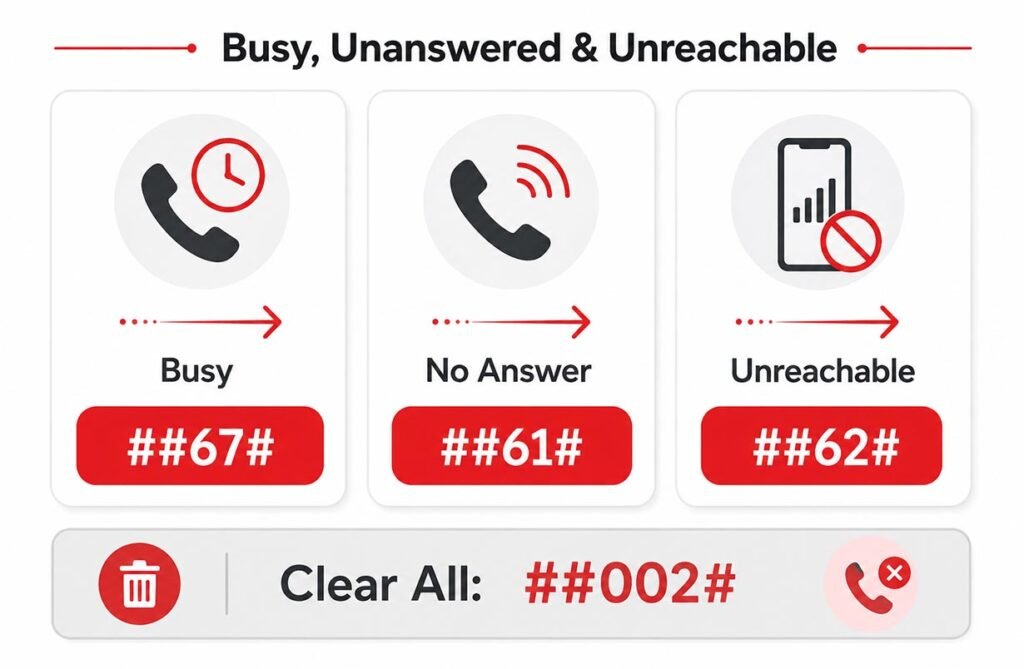
Call forwarding does not always send every call to another number. Sometimes it works only in a certain situation. If your Airtel line is busy, ##67# can cancel busy-call forwarding. If calls are forwarded when you do not answer, use ##61#. To stop forwarding when your phone is switched off or outside network coverage, use ##62#.
These settings work separately. For example, removing busy forwarding does not always remove unreachable forwarding. This is why it is useful to understand which condition is causing the problem. If you are unsure, ##002# may be more convenient because it can clear several active diversion settings together.
How to Check If Call Forwarding Is Active on Airtel
Before changing anything, you may want to check whether unconditional call forwarding is active. Dial *#21# from your Airtel line and press the call button. Your phone may display the current forwarding status. This can help you understand whether incoming calls are being sent directly to another number.
If the status shows that forwarding is active, use the suitable Airtel Call Forwarding Deactivate Code and test your number again. Ask someone to call you or use another phone. Testing is important because it confirms whether your Airtel number now receives incoming calls normally.
Difference Between ##21# and ##002# on Airtel
The codes ##21# and ##002# may look similar, but they have different purposes. ##21# is mainly used to cancel unconditional call forwarding. This is the setting that sends every incoming call to another number without first ringing your Airtel phone.
By comparison, ##002# is a broader cancellation code used to clear call-divert settings. It is useful when you cannot remember whether forwarding was set for busy, no-answer, unreachable, or another condition. If only all-call forwarding is enabled, ##21# is usually enough. If several forwarding rules may be active, ##002# is the better code to try.
What to Do If the Airtel Deactivate Code Does Not Work
If the code does not work, first check that your Airtel SIM has a proper network signal. Type the code again carefully and make sure you use both # symbols where needed. Dual-SIM users should also confirm that Airtel is selected before pressing the call button. Restarting your phone after changing the setting can sometimes help refresh network settings.
If calls still go to another number, check the forwarding settings inside your Phone app. Remember that voicemail can also use conditional forwarding, so an unanswered call going to voicemail does not always mean normal call divert is still active. If the issue continues, contact Airtel customer support for help with your line.
How to Disable Airtel Call Forwarding on Dual SIM Phones
Dual-SIM phones need extra attention because each SIM has its own network settings. When entering an Airtel Call Forwarding Deactivate Code, choose the Airtel SIM instead of your second mobile line. Otherwise, you may change the call settings of the wrong SIM and see no difference on your Airtel number.
On Android, you may be asked which SIM should make the call after entering the code. On iPhone, forwarding settings can also depend on the selected cellular line. After disabling the feature, make a test call to the Airtel number to make sure it rings directly.
FAQs
Understanding call forwarding is easier when you know that all calls, busy calls, unanswered calls, and unreachable calls can have separate rules. The Airtel Call Forwarding Deactivate Code gives you a quick way to remove these settings without installing extra software. Use the correct code, select the right SIM, and always test your number after making a change.
What is the code to disable all Airtel call forwarding?
Dial ##002# and press the call button. It can clear active call-divert settings from your Airtel line.
How do I stop Airtel forwarding for all incoming calls?
Use ##21#. This code is designed to cancel unconditional forwarding, where every call goes directly to another number.
How can I check whether Airtel call forwarding is active?
Dial *#21# to check the status of unconditional call forwarding. Your phone should display available network information.
Can I deactivate Airtel call forwarding on an iPhone?
Yes. Enter the relevant code through the iPhone Phone app, or check Settings > Apps > Phone > Call Forwarding if the option is available.
Why are calls still going to voicemail after forwarding is disabled?
Voicemail may use its own conditional network settings. A call reaching voicemail does not always mean that normal call forwarding is still active.