The Intel Driver and Support Assistant is a free Windows tool developed by Intel. It checks your computer, identifies supported Intel hardware, and displays available driver or software updates. This can save time because you do not have to drive manually. This review explains how the tool works, what devices it supports, where it may fall short, and whether it is a good choice for your computer.
What Is Intel DSA?
The tool, often called Intel DSA, helps users manage updates for supported Intel products. It can detect parts such as Intel graphics processors, wireless adapters, Bluetooth devices, and some network products. It then compares your installed driver version with a suitable version in Intel’s database.
The Intel Driver and Support Assistant does not replace every update tool on your computer. It mainly focuses on supported Intel hardware. You may still need Windows Update, your computer manufacturer’s support page, or another company’s official website for non-Intel devices.
How Does the Tool Work?
After installation, the software runs a small background service in Windows. When you begin a scan, it checks your system and opens the results in a supported browser, such as Google Chrome, Mozilla Firefox, or Microsoft Edge.
The scan displays detected Intel devices, installed driver versions, and available updates. You can read the driver information before downloading anything. This gives you more control and helps you avoid installing an update that you do not need.
What Are Its Main Features?
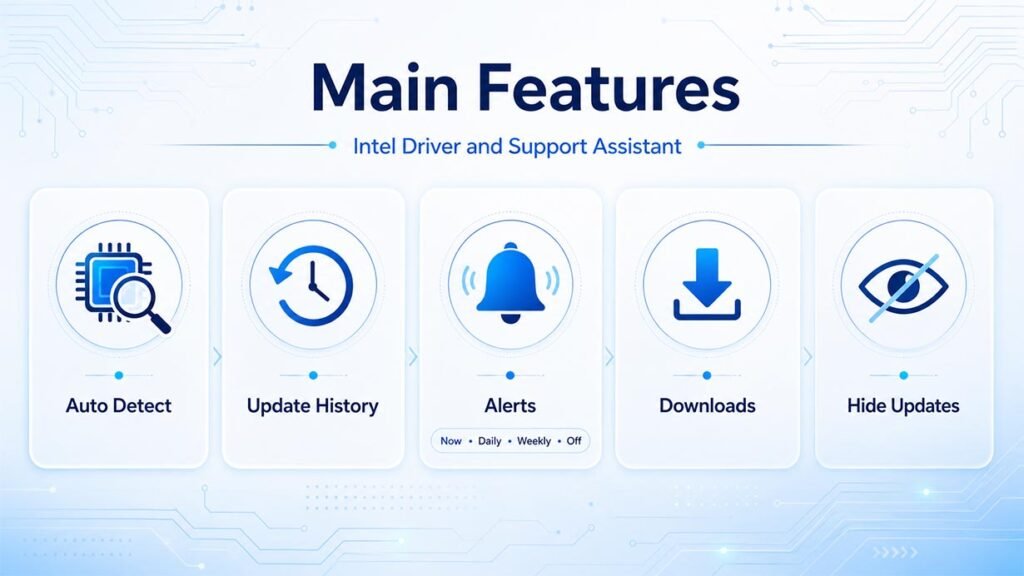
Automatic hardware detection is one of its most useful features. Many people do not know the exact model of their graphics processor or wireless adapter. The program finds this information, which reduces the risk of downloading the wrong driver.
Intel DSA can also show your update history, send update alerts, and download selected files. You can choose immediate, daily, weekly, or no notifications. It may also allow you to hide an update when you do not want to install it yet.
Which Devices and Windows Versions Are Supported?
Intel DSA works with supported versions of Microsoft Windows, including many computers running Windows 10 and Windows 11. Some older Windows systems may appear in Intel support documents, but using a current Windows version provides better security and compatibility.
The tool can support selected Intel graphics, wireless, Bluetooth, Ethernet, storage, and software products. However, support depends on the exact device model. A product may be detected during a scan but may not receive an update through the program.
Which Products May Not Be Supported?
The software does not cover every Intel product. It may not provide updates for many chipset drivers, server drivers, Linux drivers, old wireless adapters, firmware packages, and most BIOS files. Support for discontinued products is also limited.
This means the tool is useful, but it is not a complete driver manager. When no update appears, your driver may already be current, unsupported, customized by the computer manufacturer, or available only from another official source.
How to Download and Install It Safely
Download the software only from Intel’s official website. Avoid third-party driver websites because they may provide old files, unwanted applications, false download buttons, or unsafe installers. The official Intel version is free.
Open the installer, accept the licence terms, and follow the setup instructions. After installation, start the tool and allow it to scan your computer. Save your work before installing important drivers because graphics, network, or Bluetooth devices may restart during an update.
How to Install Recommended Driver Updates
Review every recommended update before installing it. Check the device name, driver version, release date, file size, and update notes. A higher version number does not always mean that you need to install the driver immediately.
Use the Intel Driver and Support Assistant to download the selected update, and then start its installer. Restart your computer when Windows or the driver requests it. After restarting, perform another scan to confirm that the new version was installed correctly.
Is It Safe for Laptops and Branded Computers?
The software itself is generally safe when downloaded directly from Intel. The bigger concern is the type of driver it recommends. Laptop brands such as Dell, HP, Lenovo, ASUS, and Acer sometimes use customized Intel drivers.
These drivers may include special battery, display, sound, power, cooling, or keyboard settings. A general Intel driver may work, but it could change some manufacturer-specific features. Laptop users should check their manufacturer’s support page before installing a major graphics, wireless, or Bluetooth update.
What Common Problems Can Occur?
A scan may fail because of a browser issue, stopped Windows service, firewall rule, proxy setting, antivirus program, or damaged installation. First, restart the computer and scan again. You can also clear your browser cache and try Edge, Chrome, or Firefox.
When the tool keeps scanning, check that its Windows services are running. Install pending Windows updates and restart the system. If the issue continues, uninstall the software and install a fresh copy from Intel’s website.
Repeated update alerts can also appear. This may happen when Windows Update replaces a driver, an installation fails, or a restart is still required. Check the installed version in Device Manager and temporarily hide the recommendation when it is not useful.
What Are the Main Pros and Cons?
The main advantages include simple system scans, official Intel downloads, clear driver details, useful notifications, and less manual effort. It is a practical choice for home users who want a trusted way to check supported Intel hardware.
Its limits are also important. It supports only selected Intel products, requires a browser and internet connection, and may offer general drivers instead of custom laptop drivers. It also cannot manage hardware from every other manufacturer.
Is Intel Driver and Support Assistant Worth Using?
For most Windows users with supported Intel hardware, the Intel Driver and Support Assistant is worth trying. It is free, simple to use, and safer than unknown third-party driver programs. It may help you find updates that improve security, stability, compatibility, and device performance.
However, you should not install every available update without reading its details. Use Intel DSA together with Windows Update and your computer manufacturer’s support website. This provides a safer and more complete driver-update process.
FAQs
Is Intel DSA free?
Yes. Intel provides the tool free of charge through its official website.
Does it support Windows 11?
Yes. It supports many Windows 11 computers that contain compatible Intel hardware.
Can it update every Intel driver?
No. Some chipset, server, BIOS, firmware, Linux, and older product updates are not included.
Is it safe to use on a laptop?
Yes, but laptop users should compare its recommendations with customized drivers from their laptop manufacturer.
Can I uninstall the program?
Yes. You can remove it through the installed applications section in Windows Settings.