Small businesses face many online threats, from stolen passwords to ransomware attacks. A single security problem can stop daily work, expose customer information, and cause financial losses. Computer Security Companies help businesses protect their computers, networks, and important data through security software, threat monitoring, and professional support. They also help owners prepare for attacks and recover from incidents. Understanding their services, costs, and protection tools makes it easier to choose a suitable security provider.
What Computer Security Companies Do for Small Businesses
Computer Security Companies provide tools and services that protect business devices, customer records, emails, and online accounts. Their work includes finding security weaknesses, blocking harmful software, and monitoring unusual activity. Some providers sell security software, while others offer expert support. They can also help businesses create security policies, manage employee access, and respond when attackers enter their systems.
A small business may not have enough money to employ a full-time cybersecurity team. Working with an outside provider gives owners access to security tools and technical knowledge. Some providers offer 24/7 threat monitoring, which means they watch for attacks outside normal working hours. This can help businesses detect suspicious activity before it causes more damage.
Why Small Businesses Need Cybersecurity
Small businesses often depend on computers for payments, customer records, accounting, and communication. When these systems stop working, the business may lose sales and customer trust. Attackers can also target smaller organisations because they may have weak passwords, old software, or limited security staff. Even a business with only a few employees needs suitable protection.
The Verizon 2026 Data Breach Investigations Report found that ransomware was involved in 48% of the breaches it analysed. This figure covers the report’s wider dataset, not just small businesses. Ransomware can lock important files and interrupt operations. Regular updates, reliable backups, and secure account access help reduce the risk and impact of these attacks.
Common Cybersecurity Threats Facing Small Businesses
Phishing is a common threat in which attackers send fake emails or messages to steal passwords and financial information. Malware can damage computers or secretly collect data, while ransomware can lock business files. Criminals may also use stolen passwords to enter cloud accounts. These threats can affect companies of any size, especially when employees are not trained to recognise suspicious activity.
Old software, insecure Wi-Fi, and weak account settings create further risks. Attackers may exploit security gaps in operating systems, websites, and business applications. Employees working from home can also expose business information through unsecured devices. According to the FTC, businesses should update software, train employees, protect their networks, and maintain regular data backups.
Essential Security Services Every Small Business Needs
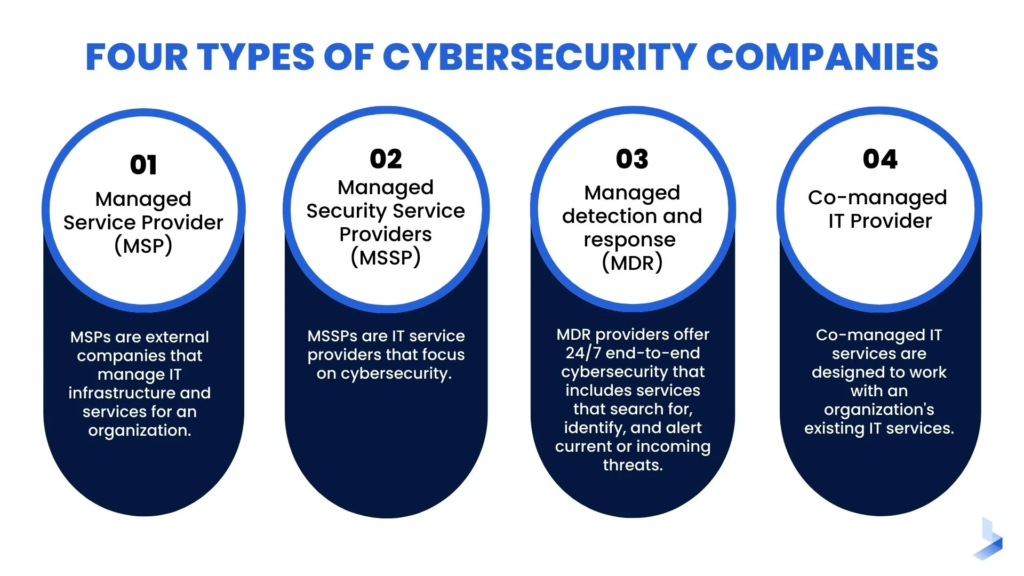
Endpoint protection helps secure laptops, desktops, and servers against malware and suspicious activity. Modern endpoint detection and response tools, known as EDR, can identify threats and help contain an attack. Businesses also need firewalls, email protection, secure passwords, and multi-factor authentication (MFA). MFA adds another verification step when someone signs in to an account.
Managed detection and response, or MDR, combines security technology with experts who investigate and respond to threats. Other useful services include vulnerability scanning, backup management, and incident response planning. A provider should explain which services are included and which require additional payment. Not every security package includes data recovery, employee training, or round-the-clock monitoring.
Computer Security Providers to Compare in 2026
Several well-known Computer Security Companies offer products for smaller organisations. Microsoft Defender for Business provides antivirus protection, vulnerability management, and endpoint detection for businesses with up to 300 users. Bitdefender GravityZone offers business device protection, ransomware defence, and centralised security management. Both have products designed to help businesses manage protection across multiple devices.
Huntress provides managed endpoint detection and response with continuous expert monitoring. Sophos also offers MDR services that investigate threats across computers, servers, and other business systems. These services are useful to compare when a business needs expert security support. Each provider has different products and service arrangements, so businesses should confirm the exact features before subscribing.
How to Choose the Right Security Company
Start by identifying your business needs. Count your computers, check where important data is stored, and decide whether employees work remotely. A retail shop may need payment system protection, while an online business may need additional website and cloud security. Consider the provider’s experience with businesses of your size and whether its software supports your existing devices.
Ask Computer Security Companies about their response times, support hours, reporting, and backup arrangements. Check whether experts can stop suspicious activity or only send alerts. Request a clear written agreement that explains responsibilities, additional charges, and how your data will be handled. The FTC recommends including specific security requirements in vendor contracts and checking that providers follow them.
Computer Security Services and Pricing
Security costs depend on the number of users, protected devices, and services required. Basic antivirus software usually costs less than a fully managed security service. For example, Microsoft’s US-listed standalone Defender for Business plan is $3 per user per month, paid annually, excluding tax. Actual costs can vary by region, reseller, package, and subscription terms.
Computer Security Companies may also charge for setup, staff training, additional devices, or emergency incident response. Managed services may require a custom quotation. Before signing a contract, compare the full annual cost rather than only the advertised monthly price. Check what happens when your business grows and whether cancellation or extra support carries additional charges.
Cloud Security, Network Protection and Employee Training
Cloud services make it easier to access business information from different locations, but they still need protection. Use strong account controls, MFA, and suitable access permissions. Secure office Wi-Fi with WPA2 or WPA3 encryption, and keep guest access separate from the main business network. Remove access when employees leave and review permissions regularly.
Employee training is another important part of security. Teach staff to recognise phishing messages, report suspicious activity, and avoid sharing passwords. Explain how to handle customer information safely and use approved devices for work. Regular short training sessions can help employees remember these practices. Security software works better when staff understand the risks and follow company rules.
How to Build a Strong Small Business Cybersecurity Plan
Begin with a list of important devices, accounts, software, and business information. Update systems, enable MFA, install suitable endpoint protection, and limit access to sensitive files. Make regular backups and keep a protected copy separate from everyday business systems. Test whether you can restore your files because an untested backup may fail when you need it.
Next, create a written plan for responding to security incidents. Assign responsibilities, record emergency contacts, and explain how employees should report problems. Review your security measures as your business grows. The NIST Cybersecurity Framework 2.0 provides a useful approach through six functions: Govern, Identify, Protect, Detect, Respond, and Recover. These steps can help smaller businesses manage security risks more consistently.
FAQs
What does a computer security company do?
It protects business computers, networks, accounts, and data through security software, monitoring, and technical support.
Do small businesses need professional cybersecurity?
Professional support can help businesses that lack the staff or technical knowledge to manage security threats themselves.
How much does small business cybersecurity cost?
Costs depend on the number of devices, software features, monitoring services, and support included in the package.
What is the difference between EDR and MDR?
EDR provides tools to detect and respond to threats. MDR adds security experts who monitor and investigate threats for the business.
Can cybersecurity software prevent every attack?
No. Security software reduces risk, but businesses also need trained employees, secure accounts, software updates, and reliable backups.