
If you no longer want to use Instagram, you can remove your account directly from the mobile app. The process is available on both iPhone and Android through Meta Accounts Center. Learning How to Delete an Instagram Account is useful because deleting the app from your phone does not delete your profile, photos, followers, or other account data. Permanent deletion must be requested from your Instagram account settings.
What Happens When You Delete Your Instagram Account
Permanent deletion removes your profile, photos, videos, comments, likes, followers, and other account information. Instagram gives you a short period before the deletion becomes final. Current guidance says the account is permanently deleted after 30 days from the deletion request. During this period, your account content is not normally visible to other Instagram users.
Meta also explains that the full deletion process may take up to 90 days after it begins. Some copies can remain in backup systems for recovery from technical problems or for certain legal, safety, or policy reasons. This does not mean that your public profile stays active for 90 days.
Back Up Your Instagram Data First
Before deleting the account, save anything you may want later. Open your Instagram profile, tap the three-line menu, and enter Accounts Center. Look for Your information and permissions, then choose the option to download or export your information. You can normally select the Instagram profile and choose which types of information you want.
The export can include items such as photos, videos, comments, profile information, and other account data. Instagram may let you choose the format and where the file should be delivered. Once the account has been permanently deleted, you should not expect to use Instagram’s data download tool for that account.
How to Delete an Instagram Account From the App Step by Step
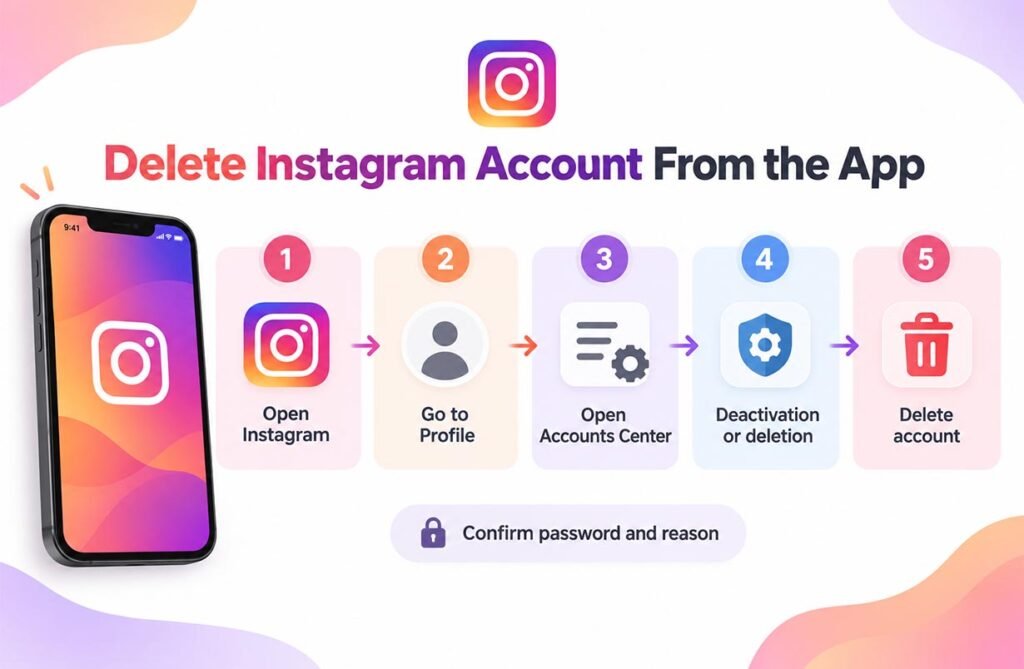
Open the Instagram app and make sure you are signed in to the correct profile. Tap your profile picture in the bottom-right corner. Next, tap the three horizontal lines in the top-right corner. Open Accounts Center. Depending on your app version, you may see Personal details or a similar account-management option.
Go to Account ownership and control, then select Deactivation or deletion. Choose the Instagram account that you want to remove. Select Delete account, tap Continue, and follow the instructions on the screen. Instagram may ask you to confirm your password or choose a reason before the request is completed.
Check the Correct Account Before You Confirm
Many people use more than one Instagram profile on the same phone. This makes it important to check the username and profile picture before you press the final delete button. If you manage a personal account, a business profile, and another page, choosing the wrong profile could start deletion for the wrong account.
If you are following a guide on How to Delete an Instagram Account, do not rush through the final screen. Read the account name carefully and make sure you still have access to its password, email address, and security method. This can also help if you decide to cancel the deletion request before the deadline.
Deleting the App Is Not the Same as Deleting the Account
Removing Instagram from your iPhone or Android phone only uninstalls the application. Your Instagram account remains active. Other people may still be able to find your profile, see public content, follow you, or send messages, depending on your privacy settings.
Logging out also does not delete an account. It only ends the current session on that device. To remove the actual Instagram profile, you need to use the deactivation or deletion controls in Accounts Center. This difference is important for anyone who wants to leave Instagram permanently rather than simply stop using the app.
How to Cancel an Instagram Deletion Request
If you change your mind during the allowed cancellation period, sign back in to the Instagram account. Instagram may give you an option to keep the account or cancel the deletion. Current guidance describes a 30-day window before the account and its information are permanently deleted.
Do not treat this period as a long-term backup plan. If you want to keep the account, cancel the deletion before the date shown by Instagram. After permanent deletion is completed, you should not expect to recover your profile or its information through normal account recovery tools.
Delete or Deactivate: Which Option Is Different?
Deletion and deactivation have different results. Deletion is meant to be permanent. Deactivation is temporary. When you deactivate an Instagram profile, your profile and much of its visible activity are hidden until you return and reactivate the account.
If you are unsure about How to Delete an Instagram Account permanently, temporary deactivation may give you more time to decide. The route is similar: open Accounts Center, go to the account ownership controls, and choose Deactivation or deletion. Instead of selecting Delete account, choose Deactivate account and follow the prompts.
What Happens to Photos, Followers, Likes, and Messages?
When permanent deletion is completed, your Instagram profile and its main account content are removed. This includes your photos, videos, comments, likes, and followers. That is why downloading important files before deletion is a smart step.
Do not assume that deleting your account can erase every copy of something that once appeared online. Other people may have saved screenshots or copies outside Instagram. Meta may also keep limited information for backup, legal, security, or policy purposes even after the normal deletion process is completed.
What to Do If You Cannot Find the Delete Option
First, update the Instagram app from the Apple App Store or Google Play Store. Then close and reopen the app. Check that you are inside Accounts Center and that you selected the correct Instagram profile. Menu names can change slightly between app versions, so look for account management, ownership, deactivation, or deletion settings.
You must also be able to access the account to request deletion. If you cannot sign in, use Instagram’s normal password or account-recovery process first. Never give your password or security code to a website or person claiming that they can delete the account for you.
FAQs
Can I delete Instagram directly from the mobile app?
Yes. Current Instagram versions allow account deletion through Accounts Center in the mobile app on iPhone and Android.
How long does Instagram wait before permanent deletion?
Instagram normally gives a 30-day period after a deletion request before the account and its information are permanently deleted. The technical deletion process may take longer.
Can I recover my account after permanent deletion?
Once the deletion becomes permanent, normal recovery is not available. If you change your mind, cancel the request before Instagram’s stated deletion date.
What is the difference between deleting and deactivating Instagram?
Deleting is permanent, while deactivation is temporary. A deactivated profile can usually be restored by signing back in.
How to Delete an Instagram Account if I forgot my password?
Recover access first using Instagram’s login or password-reset options. You normally need access to the account before you can confirm permanent deletion.