Ensora Data Collection is a digital platform built for Applied Behavior Analysis (ABA) professionals who need a simple way to record, review, and manage therapy data. It was previously known as Catalyst, a name many ABA teams may still recognize. The system combines a web portal and mobile apps, helping BCBAs, RBTs, and clinics collect client information, monitor progress, prepare session notes, and make treatment decisions from organized data.
What Is Ensora Data Collection?
The platform is designed for ABA therapy rather than general note-taking. Clinical teams can create programs, add learning targets, define behaviors, set prompts, and record client responses during sessions. A BCBA can prepare a treatment program through the web portal, while an RBT or therapist can open the same program on a mobile device and enter results while working with the client.
Once session data is synced, supervisors can review results and see whether a skill is improving, stable, or needs a different teaching method. This shared workflow can help clinics replace paper records and keep treatment information in one organized system.
How the Platform Works
The system has two main parts: the web portal and the mobile app. The portal is mainly used by administrators, clinical directors, and supervisors. It supports program setup, user management, reports, graphs, and client records. Because it works online, users need an internet connection to access and update information.
The mobile app is made for direct-care staff. Therapists can choose a client, open programs, record trials, track behavior, and complete documentation. A key feature is offline data collection. Staff can keep recording when Wi-Fi is not available during home, school, or community sessions, then sync the information later.
Main Tools Available
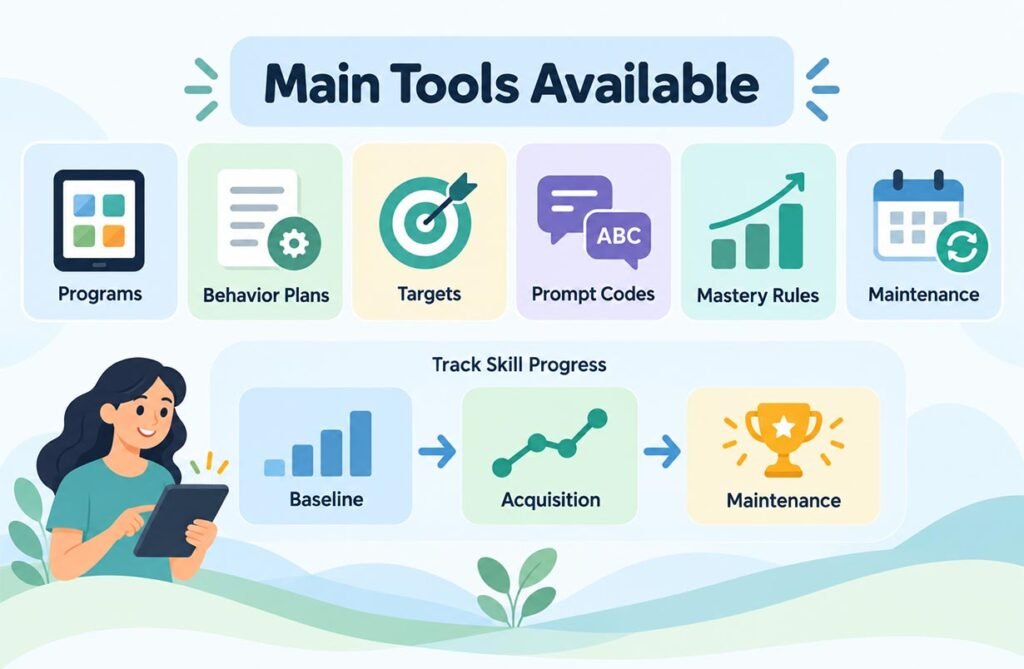
Ensora Data Collection includes tools for common ABA workflows. Teams can create skill-acquisition programs, behavior plans, learning targets, prompt codes, mastery rules, and maintenance stages. This gives clinics flexibility because every client does not need the same teaching structure.
Targets may move through Baseline, Acquisition, and Maintenance when selected rules are met. Baseline shows the learner’s starting level. Acquisition is used while a skill is being taught, while maintenance checks whether the learner keeps the skill over time. Automation can save time, but clinical staff still need to review progress.
Program Setup, Targets, and Prompts
A strong ABA program needs clear goals and accurate measurements. Supervisors can build programs with different targets and choose how each target should be measured. A communication program, for example, may include words, requests, or social responses. Each target can have its own teaching and mastery conditions.
Prompt tracking adds more detail. Therapists may use verbal, visual, gesture, model, or physical prompts. Recording the prompt level shows whether a client is responding independently or still needs support. This matters because two correct responses may show very different progress if one is independent and the other needs strong help.
Graphs, Reports, and Progress Monitoring
Graphs turn raw numbers into information that is easier to understand. A supervisor can review changes across days or weeks and see whether performance is rising, falling, or staying the same. This helps when deciding whether to continue a program, change a prompt, adjust teaching, or move a mastered target into maintenance.
Ensora Data Collection also supports reporting and progress review. Organizations can study treatment results without copying data from paper into another program. The value of each graph still depends on accurate session data, so staff must enter information carefully.
SOAP Notes and Session Documentation
The platform supports SOAP notes, commonly organized around Subjective, Objective, Assessment, and Plan information. ABA organizations can create templates with required fields, session details, signatures, locations, guardian information, and other needed items. Staff can save drafts and publish notes after required details are completed.
Published notes can support clinical and administrative work. Depending on the setup, they may be reviewed by supervisors or connected with appointment and billing processes. PDF downloads can make completed documentation easier to store or review. Keeping notes and treatment data in one system may also reduce duplicate work.
Benefits for BCBAs, RBTs, and Clinics
For BCBAs, the main benefit is better supervision. They can build programs, review graphs, manage targets, monitor therapist data, and make data-based decisions without depending only on paper forms. Having information in one place also makes it easier to compare current performance with earlier sessions.
For RBTs and therapists, the mobile workflow can reduce repeated work. Data can be entered during the session instead of being written on paper and copied again later. Clinics may benefit from more consistent records, faster review, and less manual graph creation. Ensora Data Collection can support both clinical work and daily session management.
Integrations, Security, and Data Management
The platform can connect with other products in the Ensora Health ecosystem, including ABA practice-management tools. These connections can link clinical documentation with appointments and billing workflows. A completed note may be matched with an appointment using client, staff, date, and time details, reducing repeated data entry.
Because ABA records may contain protected health information, security is important. Ensora describes features such as role-based access, authentication, audit logs, and encryption. Organizations should still manage permissions carefully, lock mobile devices, train staff on privacy rules, and review their own compliance needs.
Common Limitations and Things to Consider
No data platform is perfect. Some users may face a learning curve with program settings, mastery rules, templates, permissions, syncing, and reports. A poorly configured system can make work harder, so clinics should provide training and clear procedures.
Offline work is useful, but an internet connection is still needed to sync collected information back to the main system. The platform works best when staff understand syncing, use updated app versions, and confirm that important session records have saved correctly.
Why It Matters in ABA Therapy
Good ABA treatment depends on clear and reliable data. A therapist needs an easy way to record what happened during a session, while a supervisor needs enough detail to understand progress and make informed decisions. A digital system can make this easier by keeping programs, targets, graphs, notes, and reports connected.
The biggest benefit is not only removing paper. It is creating a clearer flow of information between direct-care staff, supervisors, and administrators. When the system is set up well and staff enter accurate information, teams can spend less time moving data between tools and more time focusing on client needs.
FAQs
What is the platform used for?
It is used by ABA professionals to record therapy data, manage programs and targets, review graphs, and complete session documentation.
Was the platform previously called Catalyst?
Yes. It was formerly known as Catalyst, so older guides and users may still use that name.
Can therapists collect data without internet access?
Yes. The mobile app supports offline data collection. Information can sync after the device reconnects to the internet.
Who normally uses the platform?
It is mainly used by BCBAs, RBTs, ABA therapists, clinical supervisors, administrators, and ABA organizations.
Does the platform support SOAP notes?
Yes. Staff can use SOAP note templates to record session information and complete required clinical documentation.