Hotstar Download for PC is a common search for users who want to watch JioHotstar on a bigger Windows screen. In India, Hotstar now works under the JioHotstar name, and PC users can stream through supported web browsers. You do not usually need an APK file, Android emulator, or unofficial Windows installer. The safest method is to open JioHotstar in a browser on Windows 10 or Windows 11, sign in, and start watching supported movies, shows, sports, and live content.
Can You Download Hotstar on a Windows PC?
Many users expect a normal desktop app when they search for Hotstar Download for PC. However, JioHotstar officially supports Windows mainly through desktop browsers. Its supported-device information lists Windows 10 and later for web viewing. This means you can use the service without installing a separate program. A browser method is also easier because it needs less storage and avoids unknown software files.
At present, the official support pages focus on browser access instead of offering a standard Windows installer. Because of this, users should be careful with websites that offer files named “Hotstar.exe” or “JioHotstar PC Setup.” Such files may not be official.
How to Watch JioHotstar on Windows 10 and Windows 11
The easiest way to use Hotstar Download for PC is to stream directly from the official JioHotstar website. Open Google Chrome, Microsoft Edge, or Mozilla Firefox on your computer. Visit JioHotstar, open My Space, and choose the login option. After signing in, search for the movie, show, sports event, or other content you want to watch.
This method works on both Windows 10 and Windows 11. It is useful for people who want a larger screen, keyboard controls, and easier multitasking. You can also bookmark the website so you can open it quickly later.
Hotstar Download for PC Without an Emulator
You do not need an Android emulator to watch JioHotstar on Windows. The browser version already supports PC streaming, so installing extra Android software is not necessary for most users. Emulators can use more RAM, storage, and processor power, and streaming services may sometimes face compatibility or protected-content problems inside them.
Using the official browser version is usually faster and safer. An emulator may only be useful for someone who specifically wants to test the Android app on a computer, but it is not the main official method for Windows viewing. The browser option is simpler for normal users.
JioHotstar PC System and Browser Requirements
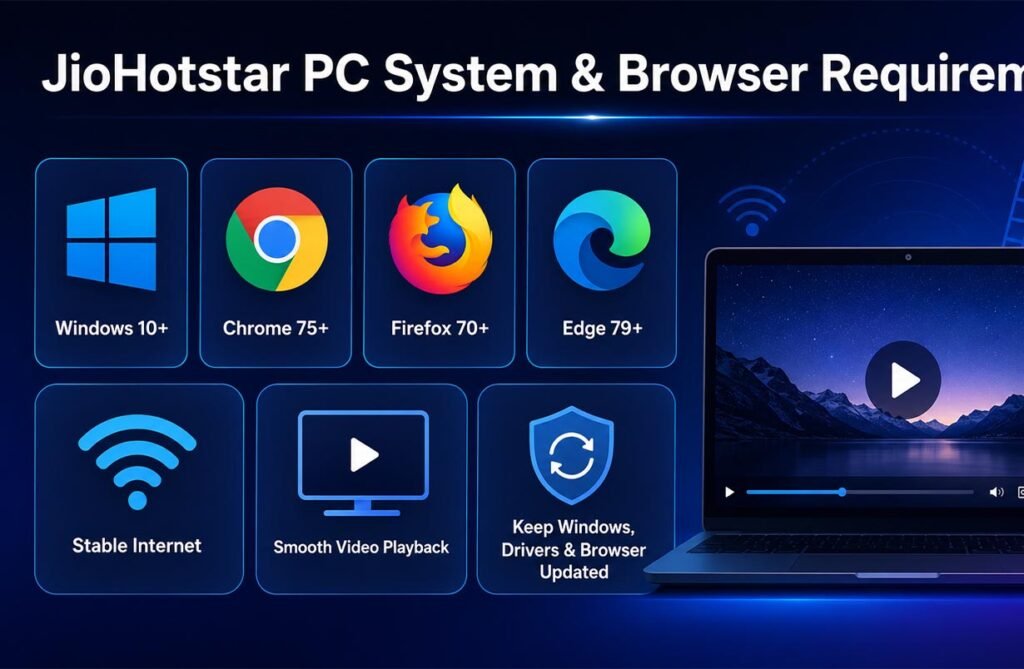
JioHotstar officially supports Windows 10 or later for desktop web access. It lists Google Chrome 75+, Firefox 70+, and Microsoft Edge 79+ among supported browsers. Even if an older version is listed as the minimum, using the latest browser version is better because it improves security, playback, and protected-content support.
A stable internet connection is also important. You do not need a powerful gaming PC, but your computer should be able to play modern web video smoothly. Updating Windows, your graphics drivers, and your browser can help reduce streaming problems.
How to Log In to JioHotstar on a Computer
To use Hotstar Download for PC, open the official website and go to My Space. Select Login and follow the available sign-in method. JioHotstar may allow you to use a mobile number and OTP or a QR-based login, depending on your account and current interface. Always enter account details only on the official platform.
If you cannot log in, check that your mobile number is correct and that the OTP has not expired. You can also refresh the page, clear browser cookies, and try again. Some content and desktop access may depend on your active JioHotstar subscription.
Can You Download JioHotstar Movies and Shows on PC?
This is where the word “download” can be confusing. JioHotstar provides offline downloads mainly through supported Android and iOS phones and tablets. Its official download instructions do not list normal Windows browser downloads as a supported offline-viewing method.
So, if you want to save a movie or episode and watch it without internet, the official mobile app is the better option. On supported mobile devices, eligible content can show a download button. Availability may depend on the title, plan, licensing, and selected video quality.
JioHotstar Video Quality and Streaming Features on Windows
JioHotstar can provide good video quality on a Windows computer. According to its support information, eligible Super and Premium users can stream supported content at up to 1080p Full HD in compatible web browsers. Real quality can still change based on internet speed, content type, device support, and network conditions.
The service may lower video quality automatically if your connection becomes weak. For smoother playback, close large downloads, cloud backups, or other apps using heavy bandwidth. A wired internet connection or strong Wi-Fi signal may also improve streaming.
How to Fix JioHotstar Not Working or Buffering on PC
If Hotstar Download for PC is not working correctly, first update your browser and reload the website. You can also press Ctrl + F5 to force-refresh the page. If buffering continues, clear browser cache and cookies, restart the browser, and check your internet connection. JioHotstar also recommends these steps for common PC playback issues.
Browser extensions may sometimes interfere with streaming, so temporarily disable unnecessary ad blockers, script tools, or privacy extensions. Protected-content settings should also be enabled because streaming platforms use DRM technology to protect licensed video.
Is Hotstar Download for PC Safe and Official?
The official JioHotstar website is the safest way to watch the service on Windows. Be careful with third-party websites offering “free premium,” “cracked Hotstar,” modified APK files, or unknown EXE installers. These files may include malware, unwanted programs, or fake login screens designed to collect personal information.
Never share your OTP, account details, or payment information with an unofficial app or website. If you see a PC download that claims to unlock paid JioHotstar content for free, avoid it. Use official JioHotstar pages and trusted app stores only.
Best Way to Use JioHotstar on a Windows PC
For most users, Hotstar Download for PC simply means watching JioHotstar on Windows through a browser. The best setup is Windows 10 or Windows 11 with a current version of Chrome, Edge, or Firefox. This method is official, easy to use, and does not require an Android emulator or unknown installer.
If offline viewing is important, use the official JioHotstar mobile app on a supported Android or iOS device. For normal PC streaming, use the website, keep your browser updated, and avoid unofficial download files. This gives you a safer and smoother JioHotstar experience.
FAQs
Can I install JioHotstar on Windows 11?
JioHotstar officially supports Windows 10 and later through compatible desktop browsers, so Windows 11 users can stream without a separate app.
Is there an official Hotstar PC app?
JioHotstar’s current support information mainly directs Windows users to the browser version rather than a normal desktop installer.
Can I download JioHotstar movies on my laptop?
Offline downloads are officially documented for supported Android and iOS mobile and tablet devices, not standard Windows browser viewing.
Which browser is best for JioHotstar on PC?
Chrome, Microsoft Edge, and Firefox are officially supported. Using the latest browser version is recommended.
Is an Android emulator required for JioHotstar?
No. You can stream JioHotstar directly in a supported browser, so an Android emulator is not required.