Intel Unison was a free Windows application that connected a computer with an Android phone or iPhone. It allowed users to manage calls, messages, photos, files, and mobile notifications from one screen. This helped people stay focused while working on their computers. However, Intel has now ended the service. This review explains what the application offered, why it was useful, whether it still works, and which alternatives are better today.
What Was the App Designed to Do?
Intel introduced the software in September 2022. It was designed to create a simple connection between a Windows 11 PC and a mobile device.
The service first appeared on selected Intel Evo laptops. It supported both Android and Apple iOS, which made it different from many older Windows phone-linking tools.
Users could transfer files, view phone photos, read messages, receive notifications, and make mobile calls from their computers. This reduced the need to move between a phone and a PC during work.
Intel described the service as a way to place the computer at the center of a connected digital experience.
Is the App Still Available?
Intel Unison is no longer an active and fully supported product.
Intel stopped manufacturing the product in June 2025. On January 1, 2026, Intel ended its normal availability and removed its official support options.
Users can no longer depend on official downloads, drivers, updates, telephone support, live chat, email help, or support-forum answers.
Some Lenovo Aura Edition computers used related connection features. Intel now directs these users to Lenovo for help. Many supported Lenovo systems use Smart Connect as the newer option.
Can an Existing Installation Still Work?
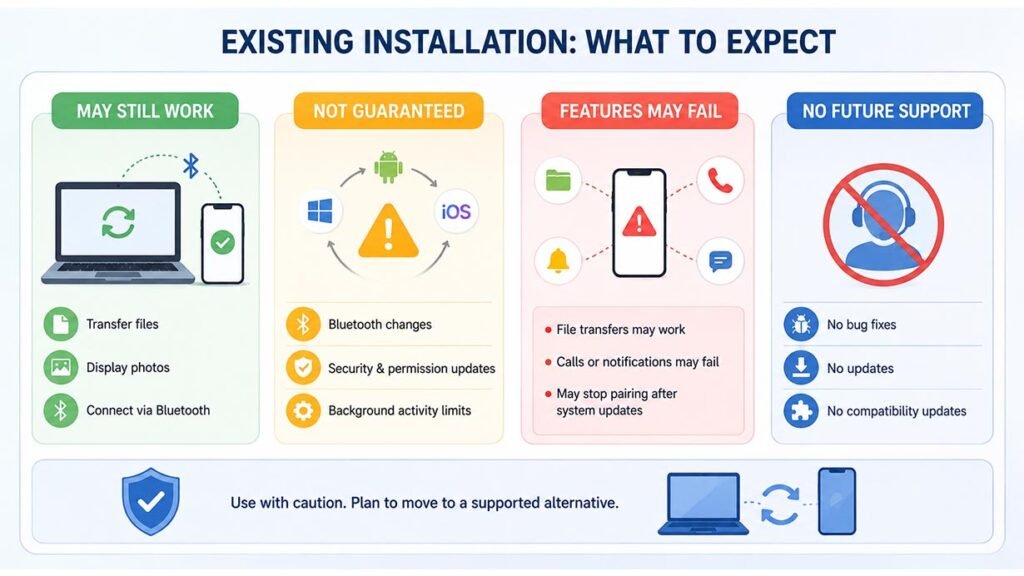
An old installation may still open and work on some computers. It may continue to transfer files, display photos, or connect through Bluetooth.
However, continued operation is not guaranteed. Windows, Android, and iOS receive regular updates. Changes to Bluetooth, security rules, permissions, or background activity may stop parts of the application from working.
For example, file transfers may continue while calls or notifications fail. The application may also stop pairing with a phone after a system update.
Because the software is no longer supported, users cannot expect future bug fixes or compatibility updates.
Which Features Did It Offer?
The application included several useful phone-to-PC tools.
Its file-transfer feature allowed users to send documents, photos, videos, and other supported files without a USB cable. Users did not need to upload files to cloud storage or email them to themselves.
The gallery feature displayed mobile photos on the PC. Users could select an image and save it to the computer for editing, sharing, or backup.
The service also displayed phone notifications. Alerts from messaging, email, calendar, and social applications could appear on the Windows desktop.
Users could control which applications were allowed to show notifications. This helped reduce unwanted alerts.
How Did Calls and Messages Work?
The calling feature allowed users to make and receive mobile calls through a computer.
A working setup required Bluetooth, microphone permission, speaker access, and phone-call permission. Users could add their contacts and start a call from the Windows application.
Call quality depended on the computer, phone, Bluetooth signal, headset, and nearby wireless interference.
Text messaging worked better with Android phones. Android users could send and receive basic messages and access more messaging functions.
iPhone users had more limits. They could handle some messages while connected, but full message history, attachments, and group conversations were not always available.
These limits mainly came from Apple’s tighter control over iOS communication features.
How Did Setup and Pairing Work?
To set up Intel Unison, users needed to install the Windows application and the matching mobile application.
They then turned on Wi-Fi and Bluetooth on both devices. The Windows app displayed a QR code that could be scanned with the phone. A text code was also available.
Both devices displayed a PIN during pairing. Users checked that the numbers matched before accepting the connection.
The application requested access to contacts, messages, calls, photos, files, notifications, Bluetooth, the local network, and the microphone.
These permissions were needed for the main features. However, users had to be careful because private messages, security codes, and personal notifications could appear on a shared computer.
What Devices and Systems Supported It?
The requirements changed during the product’s lifetime.
Early versions focused on selected Intel Evo computers running Windows 11. Later recommendations included a 13th-generation Intel Core i5 processor or better, 8 GB of RAM, Bluetooth 5.2, and supported Intel wireless hardware.
Later mobile requirements included Android 12 or newer and iOS 17 or newer.
Meeting these requirements did not always guarantee full compatibility. Support also depended on the computer manufacturer, processor, drivers, operating-system version, and application release.
The software was mainly designed for Windows 11. Windows 10 was not its official target system.
What Were Its Main Strengths and Weaknesses?
The biggest strength was support for both Android phones and iPhones.
The clean interface placed calls, files, photos, messages, and notifications in one location. The application was also free and easy for beginners to understand.
It helped users remain focused on their computers. A full keyboard also made replying to messages faster.
However, the iPhone experience was limited compared with Android. Wireless connections could also become unstable, especially when Bluetooth signals were weak.
Some features changed depending on the phone manufacturer, mobile carrier, messaging application, and operating system.
The application also required access to private information. Its biggest weakness today is the lack of security updates and official support.
Is It Safe to Use After Support Ended?
Using discontinued software always carries some risk.
Intel published a security advisory in February 2024 for versions older than C15. The company recommended updating the Windows and mobile applications to version C15 or newer.
That solution was useful while updates were still available. It is less useful now because the product has reached the end of support.
Users should not download installers from unknown third-party websites. These files may be old, changed, incomplete, or infected with harmful software.
Even a genuine installer may contain problems that will never receive a fix. A supported replacement is therefore a safer long-term choice.
What Are the Best Alternatives?
Microsoft Phone Link is the closest general replacement for Windows users.
It supports Android phones and iPhones. Depending on the device, users can access messages, recent photos, calls, mobile notifications, and selected applications from a Windows PC. Android normally receives more complete features than iPhone.
Lenovo Smart Connect is another useful option for supported Lenovo and Motorola devices.
For simple file transfers, users can consider Google Quick Share or LocalSend. These tools focus mainly on moving files between nearby devices.
KDE Connect is useful for people who prefer an open-source solution. iPhone users who mainly need photos and files can also use iCloud for Windows.
Is Intel Unison Still Worth Using Today?
Intel Unison was a useful service during its supported years. It offered a simple way to manage common phone tasks from a Windows computer.
Its Android and iPhone support, clean layout, free tools, and easy file transfers made it attractive to many users.
However, the situation is different in 2026. Intel no longer maintains the software, and future system updates may break its features.
Existing users should plan to move to a supported service. New users should avoid unofficial installers and choose an active alternative.
The application remains an interesting part of Intel’s software history, but it is no longer the best choice for safe and dependable phone-to-PC connections.
FAQs
Is the software officially discontinued?
Yes. Intel ended its normal availability and support on January 1, 2026.
Can I download it from Intel?
No. Intel no longer provides the normal official product and driver downloads.
Did it support iPhones?
Yes, but iPhone messaging and notification features were more limited than Android features.
What is the closest replacement?
Microsoft Phone Link is the closest general replacement for most Windows users.
Could it transfer files without a cable?
Yes. It used wireless connections to transfer supported photos, documents, videos, and other files.